Product

Community

Resources

English
Information as of September 30, 2026

How to use Magical Draw, what to do when you're stuck, and how it differs from Magma

We've gathered fixes for common problems such as not being able to draw, slowness, and wanting more layers, based on the official FAQ. We also explain how Magma differs.

This page was written by Code Charm, Inc., which runs Magma. MagicalDraw (Magical Draw) is a kuku.lu service and is not affiliated with us. We use the name only to describe it.

01ABOUT

What is Magical Draw (MagicalDraw)?

Magical Draw is a free oekaki chat (drawing chat) run by kuku.lu. No sign-up is needed: you can create a room with one button, anonymously.

There's no limit on people or time, and rooms you create stay available. There are apps for iOS, Android and Kindle Fire, and you can draw in the same room as people on computers and phones.

It also has games such as 'Oekaki no Numa' and a random prompt roulette, and is popular as a place to have fun with friends. It's Japan's go-to drawing chat site and has been running for more than 10 years.

02HOW TO

How to use Magical Draw

The basics take five steps. Based on the official how-to guide and FAQ.

  1. Create or enter a room

    Press 'Create room' on the top page and you get a room where you're the owner. To draw with people you don't know, enter a public room under 'Looking for participants'.

  2. Send the URL to invite friends

    Rooms start out private, and only people with the URL can enter. Set an owner password so you don't lose your owner rights.

  3. Set up your pen and pen pressure

    When drawing with a pen tablet or Apple Pencil, turn 'Pressure' ON in the palette. When drawing with a mouse, turn pressure off.

  4. Use the two layers for different parts

    There are two layers, and layer 1 is on top. Putting line art on layer 1 and color on layer 2 makes drawing easier.

  5. Save your drawing

    Press 'Download canvas' from the 'Save' button to save it as a PNG.

03TROUBLE

What to do when you're stuck in Magical Draw

We've gathered common problems based on the answers in the official FAQ ('Frequently asked questions and answers'). Where it's relevant, we also say how Magma handles it.

Q1I can't draw with my pen or mouse

If 'Pressure' is ON in the palette, you can't draw with a mouse (official FAQ). Turn pressure off when you use a mouse. If your pen tablet won't draw, turn on 'Digital Ink' (Windows Ink) in the tablet settings and close other browsers, then try again.

Official FAQ โ†—

Q2It's slow / choppy

The official FAQ says phones and tablets crash because the device runs out of memory. When it's slow, try restarting the device, clearing the browser cache and turning off 'Undo drawing'. If lines look choppy, check that 'Pen smoothing', added on September 28, 2026, is on.

Official FAQ โ†—

Q3I want more layers

There are two layers and you can't add more (official how-to guide). If you merge finished parts into one layer, you can use the freed layer for the next step. The owner may have disabled merging with feature limits (official FAQ).

Official guide โ†—

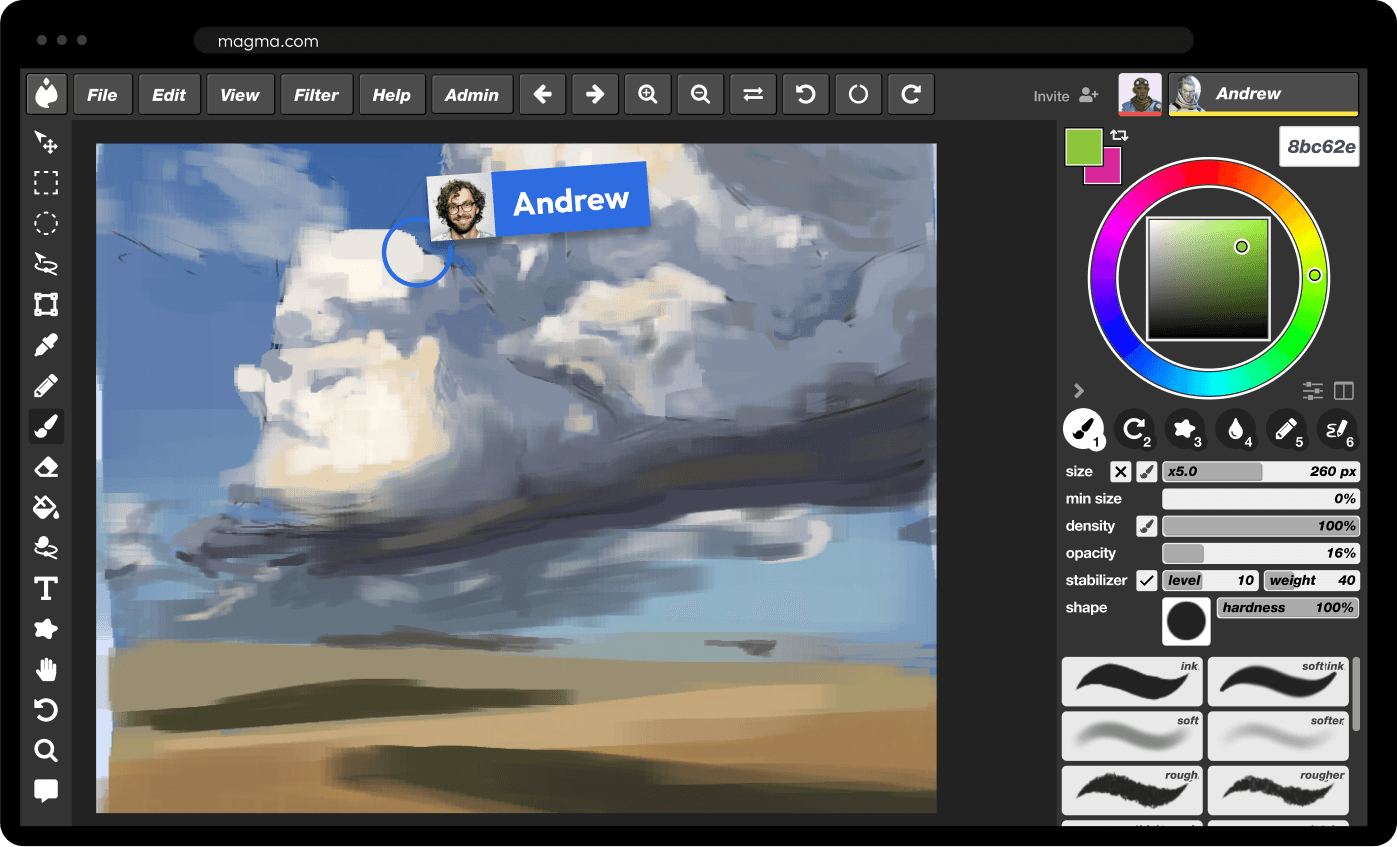
MagmaMagma gives you up to 60 layers on the free plan (200 on Blaze), and each layer belongs to the person drawing on it.

Q4Undo only works once

Undo ('undo drawing') only covers your last stroke, within 5 seconds (official FAQ). To go back further, the owner can use rollback to return to a canvas that is auto-saved every few minutes.

Official FAQ โ†—

MagmaIn Magma you can undo with Ctrl+Z, and you can also go back to an earlier state from version history (7 days on the free plan).

Q5I want to talk while drawing

Magical Draw has no voice calling. The official FAQ points to kuku.lu's separate service 'chaat', and the official how-to guide suggests Discord and similar apps.

Official FAQ โ†—

MagmaMagma has built-in voice chat, so even on the free plan you can talk with the people on your canvas while you draw.

Q6A troll erased or drew over my drawing

The owner can use rollback to restore the canvas from before it was trolled (official FAQ). Entry passwords, bans, approval before drawing and the 'view-only while the owner is away' setting are also available.

Official FAQ โ†—

MagmaIn Magma each layer has an owner, and other people can't draw on that layer.

Q7I want to save my drawing

Anyone can save a PNG by pressing 'Download canvas' from the 'Save' button (official FAQ). Since November 2024 you can also download a PSD or ZIP with the layers kept. Owners can also save to the server.

Official FAQ โ†—

Q8The image looks rough on my phone

On Android and iPhone, the canvas is shown scaled down to at most 1,000ร—1,000px so it runs smoothly (official FAQ). The actual canvas quality doesn't change. You can avoid it by using a computer or iPad, or by keeping the canvas within 1,000ร—1,000px.

Official FAQ โ†—

Q9I want to delete a room

Only the owner can delete a room. Choose 'Close' under 'Change room settings' on the entry page (official FAQ).

Official FAQ โ†—

Q10I want to draw alone / I don't want strangers coming in

Rooms are created private, and nobody can enter unless you share the URL (official FAQ). If you're worried, you can also set an entry password.

Official FAQ โ†—

04COMPARE

Magical Draw vs Magma

ItemMagical DrawMagma (free / Blaze)
PriceFreeFree. Blaze is $9.99/month
AdsYesYes on the free plan; none on Blaze
Sign-upNot needed (anonymous). Logging in with X, Discord, Google or Apple is optionalYou can start drawing without signing up; you're asked to create a free account later
People per room / canvasNo limit (the owner can set a maximum)Up to 30 per canvas (50 on Blaze); hundreds on a board
VoiceNone (the official FAQ points to the separate service chaat)Built-in voice chat (also on the free plan)
Text chatYes (whispers too)Yes
Layers2 (shared by everyone)60 (200 on Blaze); each layer has an owner
UndoLast stroke only, within 5 secondsCtrl+Z to undo; version history 7 days (unlimited on Blaze)
When you see others' strokesIn our test on September 30, 2026, a stroke appeared after it was finishedShown live, while it's being drawn
Pen pressureYes (on Mac, Chrome only)Yes (pen tilt too)
ToolsPen (incl. mask pen), eraser, eyedropper, fill, lasso, stabilizerBrushes that mix color, stabilizer. Photoshop-style shortcuts (B brush, E eraser, I eyedropper, V move, Shift+N new layer)
Canvas size100โ€“3,000px per side (official FAQ)4,096ร—4,096px (8,192ร—8,192px on Blaze)
Saving / exportPNG, layered PSD and ZIP, GIF animation, canvas time-shiftEvery stroke saved to the cloud; PNG, layered PSD
PlatformsBrowser; iOS, Android and Kindle Fire appsBrowser; Windows and Mac desktop apps; no phone app
Anti-trollingEntry password, bans, sub-owners, approval before drawing, rollback and morePer-layer owners, permissions, kick/block, report, restore from version history
CommunityPublic room list, games such as 'Oekaki no Numa'Art Jams, profiles, gallery; 5M+ artists

Information as of September 30, 2026. Magical Draw details come from its official site, FAQ and announcements; Magma's from its pricing page. Things can change, so please also check each service's official site.

05WHICH

Magical Draw and Magma: who each one suits

Magical Draw suits people whoโ€ฆ

  • People who want to start drawing right away, without an account
  • People who want to draw with a big group without worrying about headcount
  • People who want to draw in a phone or tablet app
  • People who want to play games such as 'Oekaki no Numa'
  • People who want to keep a room for a long time and use it with the same group

Magma suits people whoโ€ฆ

  • People who want to take their time, splitting line art, color and background into layers
  • People who want to talk while drawing without a separate app
  • People who don't want others drawing over their layer
  • People who want the same shortcuts as Photoshop
  • People who want to draw with artists worldwide in Art Jams

06LIVE

Live drawing rooms you can join now

These are Art Jams running on Magma now. Draw together on one canvas, following a prompt.

07FAQ

Frequently asked questions

Using Magical Draw on your own

Yes, you can use it alone. Rooms are created private, and nobody can enter unless you share the URL (official FAQ). The official site also has an 'Offline mode'.

Magical Draw's limit on people

Magical Draw rooms have no limit on people (official FAQ). However, low-spec computers and phones may not keep up in big rooms, and the owner can set a maximum. Magma allows up to 30 people per canvas (50 on the Blaze plan), and hundreds on a board.

When Magical Draw is slow

In most cases the device lacks power or memory. The official FAQ suggests restarting the device, clearing the browser cache and turning off 'Undo drawing'. Owners can also make the canvas smaller.

Benefits of logging in to Magical Draw

If you're logged in, you can get back owner rights you've lost, because owner info disappears when you change browser or computer (official FAQ). You can also enter rooms that require login. You can log in with an X, Discord, Google or Apple account.

Saving a drawing in Magical Draw

Press 'Download canvas' from the 'Save' button to save a PNG (official FAQ). You can also download a PSD or ZIP with the layers kept, and owners can save to the server.

Choosing between Magical Draw and Magma

For casual fun with no account, Magical Draw; to take your time with layers while you talk, Magma. Both are free, so using each for what it does best is also a good option.

When you want to take your time with layers while you talk, give Magma a try too.

Try Magma with others for free

Join the one and only art collaboration platform for all kinds of digital artists, art communities, game developers, concept artists, and other creative teams.

Try Magma with others for free

Join the one and only art collaboration platform for all kinds of digital artists, art communities, game developers, concept artists, and other creative teams.

Try Magma with others for free

Join the one and only art collaboration platform for all kinds of digital artists, art communities, game developers, concept artists, and other creative teams.